
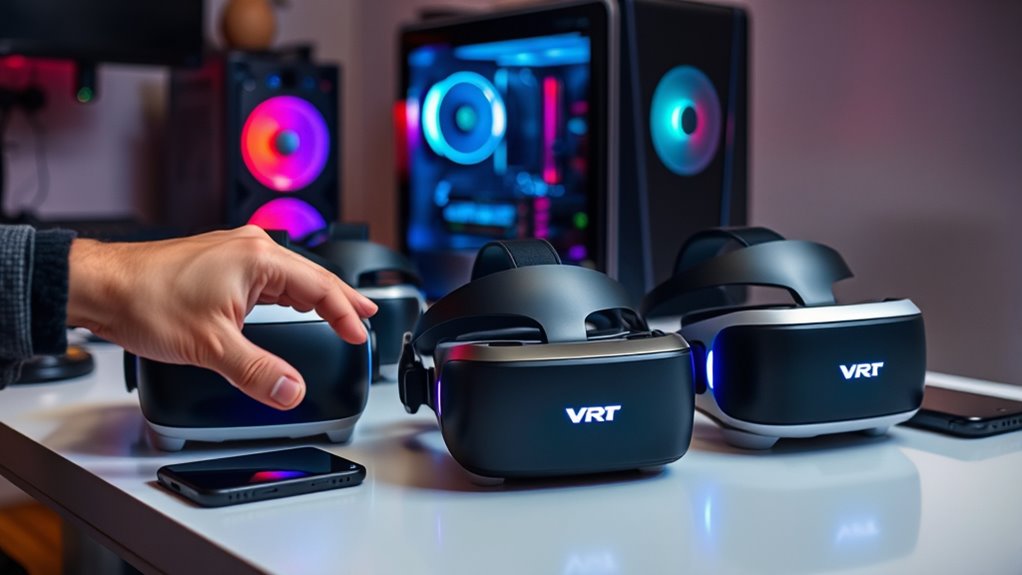

To determine which VR headsets work with your devices, start by identifying the type of headset: tethered, standalone, or mobile. Next, check your device’s specifications against the headset requirements, focusing on compatibility with operating systems, graphics cards, RAM, and connection methods. Don’t forget to investigate common troubleshooting issues like software conflicts or outdated drivers. Understanding these factors can enhance your virtual reality experience, and there’s more to explore about the future of VR compatibility.
Understanding VR Headset Types
When you immerse yourself in the world of virtual reality, it’s important to understand the different types of VR headsets available, as each offers unique features and experiences. You’ll find three main VR headset types: tethered, standalone, and mobile. Tethered headsets, like the Oculus Rift and HTC Vive, connect to powerful PCs, delivering high-quality immersive experiences but limiting your mobility. Standalone headsets, such as the Oculus Quest, don’t require a PC or console, providing freedom of movement while still offering impressive graphics. Mobile VR headsets, like Google Cardboard, use your smartphone to create an entry-level experience, perfect for casual users. By understanding these VR headset types, you can choose the right device to elevate your virtual reality adventures.
Key Compatibility Factors
When considering a VR headset, you’ll want to pay close attention to key compatibility factors like your device’s operating system and connection type. Performance specifications also play a vital role, as they determine how smoothly your VR experience will run. Understanding these elements will help you make an informed choice that suits your setup perfectly.
Device Operating System
Although many VR headsets offer impressive features, their compatibility heavily relies on the device’s operating system. Each headset may support different operating systems, making it essential for you to check which ones align with your devices. For instance, some headsets work seamlessly with Windows, while others may be tailored for Android or iOS. Regular device updates can also influence compatibility; an outdated operating system might restrict functionality or prevent you from accessing new features. To guarantee a smooth VR experience, always verify your device’s OS before purchasing a headset. Embrace the freedom of choice by knowing your device’s compatibility, allowing you to fully immerse yourself in the virtual world without unnecessary limitations.
Connection Type
Device compatibility doesn’t stop at the operating system; connection type also plays a significant role in ensuring a seamless VR experience. Understanding whether you prefer wired connections or wireless options can greatly affect your enjoyment and performance.
| Connection Type | Description |
|---|---|
| Wired Connections | Typically offer lower latency and higher fidelity. Ideal for stationary setups. |
| Wireless Options | Provide freedom of movement but may introduce slight latency. Great for dynamic experiences. |
When selecting a VR headset, consider your environment and usage. Wired connections deliver stability, while wireless options offer flexibility. By aligning your choice with your preferences, you can enhance your VR adventure and fully immerse yourself in the virtual domain.
Performance Specifications
As you plunge into the world of VR, performance specifications become vital in determining how well your headset will function. You’ll want to pay close attention to the performance benchmarks set by each device. These benchmarks reveal how smoothly the headset runs and how immersive your experience will be. Don’t forget to check the hardware requirements, as they vary considerably across different headsets. A powerful graphics card, ample RAM, and a fast processor are essential for high-quality visuals and responsiveness. If your setup doesn’t meet these criteria, you might end up with lag or subpar visuals, which can hinder your VR freedom. So, verify your system aligns with the headset’s specs for an exhilarating virtual adventure!
System Requirements for Popular VR Headsets
When you’re diving into the world of virtual reality, understanding the system requirements for popular VR headsets is essential for a seamless experience. Each headset has unique VR headset features that determine its compatibility with your devices. For instance, high-end models often need powerful GPUs and CPUs to deliver peak VR gaming performance, while standalone headsets may have integrated processing capabilities.
Check your device’s specifications against the headset requirements to avoid frustration. Consider factors like RAM, graphics cards, and USB ports, which can impact how smoothly your VR experience unfolds. By ensuring your setup meets these requirements, you’ll access the full potential of your VR headset and enjoy immersive adventures without a hitch.
Connecting VR Headsets to Your Devices
When it comes to connecting your VR headset to your devices, understanding device compatibility is essential. Different headsets have specific requirements and varying connection methods, which can impact your overall experience. We’ll break down what you need to know to guarantee a seamless setup.
Device Compatibility Requirements
While many VR headsets promise an immersive experience, connecting them to your devices requires careful consideration of compatibility requirements. Understanding your device features is essential for optimizing user experience. Here’s a quick overview of common VR headsets and their compatibility:
| VR Headset | Compatible Devices | Minimum Specs Required |
|---|---|---|
| Oculus Quest 2 | PC, Mobile | USB-C, 6GB RAM |
| HTC Vive | PC | NVIDIA GTX 970, 4GB RAM |
| PlayStation VR | PS4, PS5 | HDMI, DualShock 4 |
| Valve Index | PC | USB 3.0, NVIDIA GTX 970 |
| Windows Mixed Reality | PC | USB 3.0, HDMI |
Assess these specs before diving into the VR world to guarantee a seamless experience.
Connection Methods Explained
As you explore the world of virtual reality, understanding the various connection methods available for your headset can greatly enhance your experience. VR headsets typically offer two primary connection options: wireless connections and cable types. Wireless connections provide the freedom to move around without being tethered, allowing you to fully immerse yourself in virtual environments. However, they may suffer from latency issues and require robust Wi-Fi. On the other hand, cable types—like HDMI or USB—ensure a stable, high-quality connection, perfect for demanding applications, though they limit your movement. Knowing your device’s compatibility with these methods is essential. Choosing the right connection method can considerably impact your VR journey, so weigh your options based on your preferences and setup.
Troubleshooting Common Compatibility Issues
Although VR headsets offer an immersive experience, you might encounter compatibility issues that can hinder your enjoyment. Common issues include software conflicts, outdated drivers, or insufficient hardware specifications. To tackle these problems, start with a few troubleshooting tips. First, check if your headset’s firmware is up-to-date; manufacturers often release updates that enhance compatibility. Next, verify your device meets the recommended specifications for the VR headset. Don’t overlook verifying connections; sometimes, a loose cable can cause disruptions. If you’re using a specific platform or game, consult their support page for compatibility requirements. Finally, consider reaching out to forums or the manufacturer’s customer service for additional insights. With the right approach, you can enjoy seamless VR experiences.
Future Trends in VR Compatibility
With technology evolving at a rapid pace, the future of VR compatibility promises to be more seamless and user-friendly than ever. Emerging technologies are paving the way for incredible advancements, allowing you to experience VR across various devices effortlessly. Imagine a world where cross-platform integration becomes standard, enabling you to switch from your console to your PC or mobile device without missing a beat. This flexibility not only enhances your immersion but also broadens your options for gaming and experiences. As developers prioritize compatibility, you’ll likely see a surge in VR headsets designed to work with multiple systems, giving you the freedom to explore new virtual environments without constraints. Embrace the future—it’s just around the corner, ready to redefine your VR journey!
Frequently Asked Questions
Can I Use VR Headsets With Gaming Consoles?
Yes, you can use VR headsets with gaming consoles, but VR console compatibility varies. For the best console gaming experiences, make certain your headset is specifically designed for your console to maximize immersion and performance.
Are There VR Headsets for Mobile Devices?
Yes, there are VR headsets designed for mobile devices, like the Oculus Quest and Samsung Gear VR. They offer great headset compatibility for mobile gaming, allowing you to enjoy immersive experiences without needing a powerful console or PC.
What Is the Price Range for Compatible VR Headsets?
VR headsets range from budget options around $100 to premium features exceeding $1,000. It’s essential to evaluate what fits your needs, balancing affordability with the immersive experiences you’re looking to enjoy.
Do VR Headsets Require Additional Accessories for Connectivity?
Yes, VR headsets often require additional accessories for connectivity. You might need VR headset cables for wired setups or wireless VR adapters for a more freedom-oriented experience. Check compatibility to maximize your immersive adventures.
Can I Use Multiple VR Headsets on One Device?
Yes, you can use multiple VR headsets on one device, but watch for cross compatibility issues and performance differences. Each headset may require specific settings, so keep that in mind for ideal experiences. Enjoy experimenting!

[…] settings can be stored per display device profile (for example, per monitor layout or per connection type). That means the same laptop might behave differently across rooms or docking stations (vendor […]
[…] as long as the modem provides an active internet connection and your router supports the required connection type. For best results, match the modem’s technology (cable/DSL/fiber) to your service and ensure you […]
[…] Verify connection type: DHCP, Static, or […]
[…] WAN settings automatically (typically via DHCP). You only need to configure WAN credentials or connection type if your ISP requires a specific authentication method like […]
[…] the Settings app on Titan OS, then go to Network or Wi‑Fi/Ethernet depending on your connection type. Find the DNS option and switch from Automatic (DHCP) to Manual. Enter the new DNS server IP […]
[…] double-check that the VPN server address and credentials are correct and that your connection type matches the provider’s instructions. Then verify that the VPN is enabled in Titan OS and that […]