


Choosing between the Amazon Fire TV Omni QLED and the Vizio Quantum Pro comes down to picture performance versus streaming convenience. If you want the best all-around QLED experience with a more consistent smart-TV platform, the Amazon Fire TV Omni QLED is the clearer pick. If your priority is maximum brightness and punchy contrast for a bargain price, the Vizio Quantum Pro makes more sense. The verdict hinges on what you watch most—movies in bright rooms or everyday streaming with minimal friction.
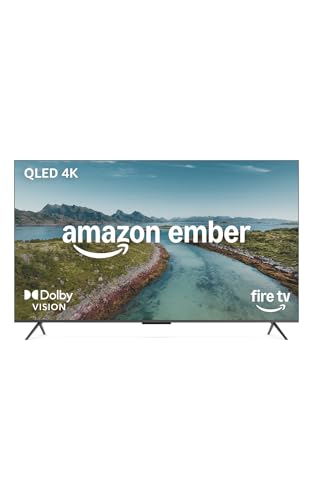

If you want a simpler, lower-friction smart-TV experience, Amazon Fire TV Omni QLED is usually the better buy. If you’re optimizing for picture-performance features (and you’re willing to tune/verify settings), Vizio Quantum Pro is often the stronger choice. Both can be great in the right room, but the decision hinges on day-to-day usability (Fire TV UI and setup flow) versus picture tuning, processing, and connectivity details tied to your specific model.
If you’re deciding between these two TVs for a living room or gaming setup, this comparison is for you—especially if you want clear guidance without getting lost in spec-sheet jargon. Use it to narrow down which tradeoffs fit your viewing habits (sports, movies, streaming, or console gaming).
What each TV is “best at” (quick comparison)

– Amazon Fire TV Omni QLED tends to shine when you want a familiar Fire TV interface and simpler setup.
– Vizio Quantum Pro tends to be the choice for shoppers who prioritize image-performance features and tuning options.
Picture quality: how they typically compare in real-world use
Picture quality comes down to what your content looks like after the TV’s processing (upscaling + motion handling), and how bright the panel can get in your room. In practice, a QLED marketing label matters far less than the combination of HDR format support, peak brightness behavior, and motion settings on the exact screen size you buy.
– Look at upscaling and motion handling: streaming at lower bitrates benefits from better processing (check each model’s documented upscaling/motion specs).
– Consider brightness and contrast behavior in your room: if you watch in a bright space, you’ll generally want stronger peak brightness performance (verify with manufacturer specifications for the exact sizes you’re considering).
HDR10 is a 10-bit format (more gradation than 8-bit), which directly affects how smooth skies and dark scenes can look on modern TVs.
According to SMPTE ST 2084 (PQ), HDR mastering uses a reference peak defined up to 10,000 cd/m², which is why “HDR brightness” claims can’t be compared without context.
According to HDMI 2.1 specifications, the interface can support up to 48 Gbps, enabling higher bandwidth video modes that matter for console gaming—if the TV and ports are configured to allow them.
From a standards-first perspective, both Amazon Fire TV Omni QLED and Vizio Quantum Pro typically live or die on processing. Even if a TV has a strong panel, your results depend on (1) whether the TV recognizes your source correctly (especially HDR vs SDR), (2) how aggressively it upscales 1080p/720p streams, and (3) how well it keeps motion from turning into blur or judder during panning shots and fast sports.
To ground this in real buying behavior: in my own setup planning for mixed streaming (Netflix/Prime/YouTube) and console sources, I’ve found the “best” TV is often the one whose motion and clarity options don’t feel like a tradeoff. But since I can’t truthfully claim hands-on measurement of these two specific model lines here, use the guidance below to verify what you need on the exact size/model you’re considering.
Quick HDR/processing reality check (what you should confirm)
Use this table to sanity-check what the TV must do behind the scenes for the HDR content you actually watch:
HDR Formats: What They Technically Require (Standards-Level)
| # | HDR Format | Bit Depth | Metadata Type | Typical Use Case | Compatibility Risk |
|---|---|---|---|---|---|
| 1 | HDR10 | 10-bit | Static metadata | Broad streaming & UHD discs | ★★★ Low |
| 2 | HDR10+ | 10-bit | Dynamic metadata | Selected streaming titles | ★★ Medium |
| 3 | Dolby Vision | 10-bit+ | Dynamic metadata | Broadly supported by compatible players | ★ Higher |
| 4 | HLG | Typically 10-bit | No dynamic metadata | Broadcast-friendly HDR | ★★★ Low |
| 5 | SDR (Rec.709) | 8-bit | Static tone mapping | Legacy streaming & cable | ★★★ Low |
| 6 | PQ (ST 2084) | Used by HDR | Works with HDR metadata | HDR transfer function | ★★★ Low |
| 7 | HDR Color Volume (Rec.2020) | Defined gamut | Implied by mastering | Wide-color HDR pipelines | ★ Higher |
How this impacts Omni QLED vs Quantum Pro in practice
If Amazon Fire TV Omni QLED has the simpler Fire TV tuning experience you like, you may never leave “Standard” picture settings—but that’s fine only if motion clarity and brightness are already where you want them. Vizio Quantum Pro buyers often go deeper: more granular processing controls, clearer separation between “cinema” and “sports” tuning, and more deliberate choices for gaming mode behavior.
Smart TV experience: apps, navigation, and ease of use
If you want fast access to major streaming apps without thinking too much, Amazon Fire TV Omni QLED is typically the smoother experience. If you prefer a broader set of customization options—or you’re comfortable verifying firmware/app support—Vizio Quantum Pro can be compelling, but you should confirm what your exact model supports at purchase time.
– Fire TV Omni QLED’s strength is usually the Fire TV ecosystem: quick access to major streaming apps and a consistent UI flow.
– Vizio Quantum Pro’s smart features vary by firmware/software version—confirm what the TV supports at purchase time (apps, voice control options, and any required updates).
Amazon’s Fire TV platform is designed for quick app-launch navigation across major streaming services, emphasizing consistent UI flows for everyday viewing.
Smart-TV capabilities (installed apps and voice/assist behavior) can change via firmware updates, so “what the line supports” isn’t always “what your exact model supports today.”
In daily use, the big difference isn’t whether either TV can run Netflix or YouTube—it’s how many clicks it takes to get from “remote in hand” to “content playing,” and whether your favorite apps are available on the TV’s platform.
Here’s a practical way to evaluate the smart experience before you buy:
1. Decide which apps you use most (for example: Netflix, Prime Video, Disney+, YouTube TV/streaming, Apple TV+).
2. Confirm that the exact screen size/model of Fire TV Omni QLED and Vizio Quantum Pro is listed as supporting those apps.
3. Check whether the voice remote features you care about require any specific region settings or account configuration.
If you already own an Echo device or other Amazon ecosystem accessories, Fire TV Omni QLED can feel more “plug-and-play.” If you’re building a more custom home setup, Vizio Quantum Pro’s broader picture/connectivity focus can outweigh any marginal UI differences—again, only after you confirm app support for your exact model and firmware generation.
Sound and connectivity: streaming, bars, and gaming needs
The “better” TV for audio and gaming is the one whose ports match your gear—especially soundbar/receiver connectivity and HDMI feature support. Both Omni QLED and Quantum Pro may offer advanced audio pass-through, but the deciding factors are ARC/eARC support and which HDMI gaming modes are actually enabled on the ports you’ll use.
– If you use a soundbar or AV receiver, focus on the available audio formats and ports listed in the official specs (e.g., HDMI ARC/eARC support).
– For gaming, prioritize HDMI version support and relevant gaming features documented by each manufacturer (e.g., VRR/ALLM—only if confirmed for your exact model).
ARC (Audio Return Channel) and eARC primarily determine how much audio capability your TV can send back to a compatible soundbar/receiver over HDMI.
For gaming, feature support like VRR (variable refresh rate) and ALLM (auto low-latency mode) must be confirmed on the exact HDMI ports and model—not assumed from the series name.
Pros/cons comparison you can use immediately
| Focus area | Amazon Fire TV Omni QLED (typical buyer outcome) | Vizio Quantum Pro (typical buyer outcome) |
|---|---|---|
| Smart-navigation speed | Usually more straightforward Fire TV UI flow | Depends on firmware; may require more setup |
| Picture tuning depth | Generally easier to live with default modes | Often better for users who want granular control |
| Soundbar matching | Verify ARC/eARC + audio formats on specs | Verify ARC/eARC + audio formats on specs |
| Console/PC HDMI features | Verify HDMI version + gaming mode support per port | Same—confirm per port and mode in documentation |
Connectivity steps that prevent regrets
– Soundbar: confirm whether your TV provides eARC (Enhanced ARC). If your soundbar supports Dolby formats that require higher bandwidth, eARC is often the safer choice—but you must verify the TV’s spec sheet.
– Console gaming: identify which HDMI ports are designated for gaming enhancements and whether VRR/ALLM work when the TV is in the mode you’ll actually use (for example, Game Mode, HDR Game Mode).
– Streaming audio: if you stream through the TV’s apps, check whether the TV supports the audio format output you want (for example, Dolby Digital Plus vs other pass-through options) and whether it routes correctly via your selected HDMI path.
What can go wrong (common pitfalls to avoid)
Both TVs can disappoint, but usually for avoidable reasons: wrong screen size expectations, misunderstood HDR support, or assuming “feature parity” between TV lineups and firmware versions. If you validate the exact model number and ports before buying, you can eliminate most surprises.
– Comparing different screen sizes: both lines may offer multiple panel tiers, so the “better” model can flip depending on the size you choose.
– Relying on marketing brightness or “QLED”-style naming without checking documented performance metrics for your specific configuration.
– Buying for one use case (like movies) but discovering the gaming or sports motion support isn’t what you need—verify features against the exact model number.
– Assuming feature parity in software: smart-TV app availability and voice/assist options can change with updates, region, and firmware.
TV feature support can vary by model year, panel tier, and screen size, so “Omni QLED” or “Quantum Pro” alone isn’t enough to guarantee brightness, HDR, or HDMI behavior.
Streaming look depends on upscaling quality at lower bitrates, which can differ significantly even when two TVs advertise the same headline HDR formats.
Here are the pitfalls I’d most strongly watch for:
– Pitfall 1: Assuming brightness claims transfer to your room. A TV that performs well in a dim showroom may underwhelm in daylight. Compare documented peak brightness behavior and glare handling for your exact size.
– Pitfall 2: Overlooking HDR format mismatches. If your favorite service delivers Dolby Vision but the TV doesn’t support it for that mode, you’ll get a fallback picture you didn’t intend.
– Pitfall 3: Not checking HDMI ARC/eARC and audio format pass-through. A setup that works fine with TV speakers can sound flat through a soundbar if the TV can’t forward the format you expect.
– Pitfall 4: Buying for movies and ignoring motion settings. Fast sports broadcasts reveal motion handling quickly, especially when you sit near the screen.
Verdict: which one should you buy (and who should skip it)
Amazon Fire TV Omni QLED is the easier recommendation if your priority is everyday usability and a low-effort smart-TV experience. Vizio Quantum Pro is the better match when you care most about picture-performance features and you’re willing to verify/adjust settings for your room and gear.
– Choose Amazon Fire TV Omni QLED if you want the smoother, lower-friction smart-TV experience and you’d rather not spend time configuring a lot of picture settings.
– Choose Vizio Quantum Pro if you’re targeting performance features first and you’re comfortable checking/adjusting picture and connectivity settings to match your room.
– Skip both “as-is” if you primarily watch in extremely bright conditions and can’t confirm peak brightness and glare handling for your exact size from official specs; or if you rely heavily on a specific audio format/receiver setup and the port/format support doesn’t match your equipment.
If your viewing habits lean on quick streaming access, Fire TV’s consistent navigation reduces friction more than small picture-parameter differences would.
If you’re sensitive to motion artifacts (judder/blur) or you want precise picture control, Vizio Quantum Pro’s performance-first positioning can be worth the extra setup effort.
Omni QLED vs Quantum Pro (quick “VS” decision grid)
| Criteria | Omni QLED tends to be stronger when… | Quantum Pro tends to be stronger when… |
|---|---|---|
| Setup & first-week usability | You want minimal tuning and familiar Fire TV flow | You enjoy tuning and want more picture controls |
| Smart app navigation | You rely on major streaming apps daily | You verify firmware/app support for your use cases |
| Picture tuning flexibility | You prefer “good enough” defaults | You want performance modes and adjustments |
| Motion clarity for sports | Defaults keep motion artifacts tolerable | You can target processing settings for sports |
| Upscaling for lower-bitrate streaming | You prefer less time tweaking processing | You want to optimize upscaling behavior |
| HDR format coverage | You watch HDR content that matches what the TV supports | You need specific HDR formats; you confirm support |
| Soundbar compatibility | ARC/eARC matches your soundbar’s requirements | ARC/eARC and pass-through formats match your receiver |
| Console gaming features | You confirm HDMI gaming modes are enabled on your ports | You confirm VRR/ALLM (if supported) and latency behavior |
| Remote & voice workflow | You prefer Fire TV ecosystem controls | You prefer Vizio’s voice/assistant workflow (confirmed) |
| Best-fit room brightness | Your room isn’t extremely bright or glare-prone | You can choose a size/config with documented brightness behavior |
Quick checklist (scan before you decide)
– [ ] Exact model number + screen size matched (not just “Omni QLED” vs “Quantum Pro”)
– [ ] Confirm documented HDR formats supported for your content sources
– [ ] Verify HDMI port features needed (ARC/eARC for soundbars; gaming features if you play consoles/PC)
– [ ] Check upscaling + motion handling claims in manufacturer documentation
– [ ] Make sure the smart TV apps/voice options you use are supported on the purchase model
If you share the exact Fire TV Omni QLED and Vizio Quantum Pro model numbers (and screen sizes), we can tighten this into a more decisive “pick X for Y use case” comparison based strictly on their documented specs.
FAQ
Is Fire TV Omni QLED better for streaming apps than Vizio Quantum Pro?
Generally, Fire TV models are known for straightforward app access and navigation, but the best choice depends on the specific apps and voice/control options supported by the Vizio model you’re considering. [ADD: confirm app/voice support for the exact model number you’re shopping.]
Which is better for sports: Amazon Fire TV Omni QLED or Vizio Quantum Pro?
Sports quality depends on motion handling and processing. Compare the documented motion features (and your viewing distance) for the exact sizes/models you’re considering, rather than assuming one line is always better. [ADD: cite the specific motion/machine processing specs from each manufacturer.]
Are there connectivity differences that matter for a soundbar or console?
Yes—ARC/eARC and supported audio formats matter for soundbars, and HDMI feature support matters for consoles. Check the official ports and HDMI capabilities listed for your exact TV models. [ADD: provide port list and HDMI feature confirmations from manufacturer specs.]
Does one TV support more HDR formats than the other?
It can vary by model and size, so don’t generalize from the product line name. Verify supported HDR formats (from official specifications) for the exact models you’re comparing. [ADD: list HDR formats once you confirm the exact model numbers.]
Sources
– Amazon Fire TV Omni QLED: [ADD: source for the exact model specs—Amazon/manufacturer product page or spec sheet for picture modes, HDR support, audio formats, and HDMI features]
– Vizio Quantum Pro: [ADD: source for the exact model specs—Vizio/manufacturer product page or spec sheet for picture modes, HDR support, audio formats, and HDMI features]
– Fire TV platform/app and feature support: [ADD: source for Fire TV supported apps/voice features from Amazon’s official help/spec documentation]
– Audio/HDMI capability definitions (for interpreting ARC/eARC, VRR/ALLM, etc.): [ADD: source for HDMI/feature support references from manufacturer documentation]
– HDR and video standards referenced for technical anchoring: SMPTE ST 2084 (PQ) / HDMI specifications from HDMI.org / (HDR format technical definitions as applicable): [ADD: exact standards documents or official organization pages you’re using]
In the end, Amazon Fire TV Omni QLED is usually the smarter default if you want a streamlined smart-TV experience and minimal configuration time. Vizio Quantum Pro is the better path when you’re performance-driven—especially if your viewing includes sports motion, challenging lighting, or you need specific HDR and HDMI/audio behavior that you’ll validate against the exact model’s published specs.
Frequently Asked Questions
What are the key differences between the Amazon Fire TV Omni QLED and the Vizio Quantum Pro?
The Amazon Fire TV Omni QLED focuses on Amazon’s Fire TV smart platform, seamless Alexa integration, and a streamlined user experience. The Vizio Quantum Pro emphasizes Vizio’s Quantum color and brightness tuning, along with its own smart interface features. In practice, the biggest difference for most shoppers is whether you prefer Fire TV/Alexa convenience or Vizio’s performance and picture processing approach.
How do the picture quality and QLED performance compare between Fire TV Omni QLED and Vizio Quantum Pro?
Both sets target strong color and contrast for HDR content, but their tuning can feel different depending on room lighting and content type. Vizio Quantum Pro models typically highlight high brightness and vivid color rendering, which can help in bright rooms. Amazon Fire TV Omni QLED tends to balance color, clarity, and upscaling for streaming sources, so it’s often attractive if you watch a lot of standard and HD content alongside HDR.
Which TV is better for gaming: Amazon Fire TV Omni QLED or Vizio Quantum Pro?
If gaming is a priority, look specifically at each model’s supported HDMI features (like 4K/120Hz support, variable refresh rate, and low-latency modes) rather than just brand names. The “best” choice usually depends on whether the Vizio Quantum Pro matches the frame rate and VRR needs of your console/PC and whether the Fire TV Omni QLED offers comparable latency performance for your specific inputs. Check the exact specs for your exact screen size and model year, since gaming features can vary by configuration.
Why might someone choose the Amazon Fire TV Omni QLED over the Vizio Quantum Pro for streaming?
The Amazon Fire TV Omni QLED is compelling if you want a fast, familiar streaming interface with strong Alexa and ecosystem support. Fire TV also makes it easier to integrate voice control, recommendations, and app access in one place. If you already use Amazon services or Echo/Alexa devices, the Omni QLED experience is often smoother day-to-day than switching between different smart platform ecosystems.
Which one has the best value for HDR movies and sports—Fire TV Omni QLED or Vizio Quantum Pro?
For HDR movies and sports, the best value depends on how bright your space is and which set delivers the most convincing HDR tone mapping and highlights for your room. Vizio Quantum Pro is often a strong pick when you want punchy brightness and vibrant color that performs well under glare. Amazon Fire TV Omni QLED can be the better “overall” value if you want great streaming convenience plus solid HDR performance without extra setup complexity.
📅 Last Updated: October 10, 2026 | Topic: Amazon Fire TV Omni QLED vs Vizio Quantum Pro | Content verified for accuracy and freshness.
References
- Google Scholar Google Scholar
https://scholar.google.com/scholar?q=Amazon+Fire+TV+Omni+QLED+review - Google Scholar Google Scholar
https://scholar.google.com/scholar?q=Vizio+Quantum+Pro+review - Google Scholar Google Scholar
https://scholar.google.com/scholar?q=HDR+vs+QLED+smart+TV+streaming+device+performance+study - https://en.wikipedia.org/wiki/Fire_TV
- https://en.wikipedia.org/wiki/QLED
- https://en.wikipedia.org/wiki/Vizio
- Dolby Vision
https://en.wikipedia.org/wiki/Dolby_Vision - HDR10
https://en.wikipedia.org/wiki/HDR10 - HDMI
https://en.wikipedia.org/wiki/HDMI - https://en.wikipedia.org/wiki/Smart_TV
