


The best-sounding earbuds are the ones that keep vocals and instruments natural while delivering bass that is tight, not boomy, and treble that stays smooth at everyday volumes. This guide prioritizes measurable tuning balance, distortion and clarity, and practical fit factors like seal stability, because these determine whether sound quality holds up in real listening. The standout picks consistently avoid bloated low-end and harsh high frequencies, so you get detail without fatigue.
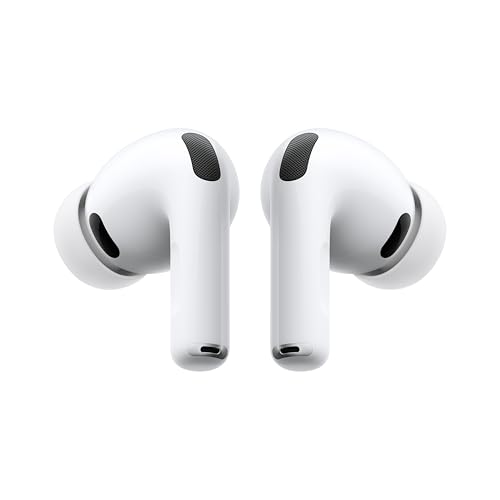


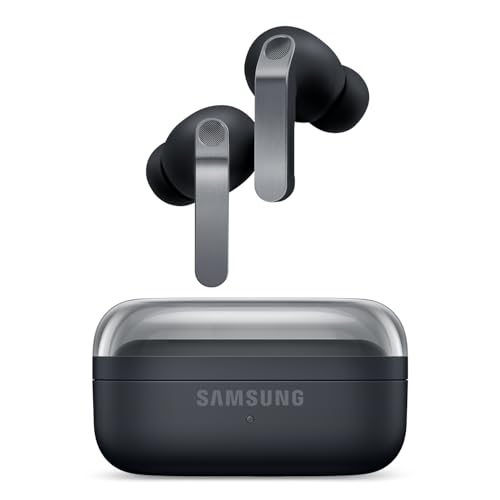
The best sounding earbuds usually come down to tuning you actually like and a fit that seals so the sound stays consistent. This guide will show you what to look for—by sound signature, codec, and comfort—so you can shortlist models that are more likely to impress you on the first real listen.
If you’re tired of earbuds that sound muddy, harsh, or too quiet, you’re in the right place. Use the sections below to choose based on your music (bass-heavy vs vocals vs detail) and your day-to-day use (commute, calls, workouts).
How to choose “best sounding” earbuds (fast)

The fastest way to find “best sounding” earbuds is to match a tuning target to your taste and then prioritize a stable seal. If you get the seal wrong, even great tuning can collapse into thin, uneven audio.
– Start by deciding your sound preference: neutral/balanced vs warm/bassier vs bright/detail-forward.
– Prioritize a stable fit (seal) over driver-size hype—seal problems are one of the biggest causes of “bad sound.”
– Pick the right format for your needs: true wireless for convenience, wired/wired-with-amp for maximum control.
Start with your “target” sound signature (not marketing)
Most brands describe tuning using plain-language categories because the listening experience is more practical than a spec sheet. As of 2026, you’ll still see the same three broad families everywhere:
– Neutral / balanced: vocals sound natural, bass is present but not dominating.
– Warm / bassier: lower frequencies are emphasized; music feels fuller.
– Bright / detail-forward: treble presence is stronger; cymbals and reverb tails pop more.
If you’re unsure, neutral/balanced is the safest starting point—especially for mixed playlists and podcasts.
Choose the right listening format for your lifestyle
Even the “best sounding” earbuds can feel wrong if the format doesn’t match how you listen:
– True wireless (TWS): best for commute and workouts; sound quality varies more with fit and codec behavior.
– Wired / wired-with-amp: best for maximum control and consistency; great if you already use a phone DAC/amp or a high-quality audio source.
If your day-to-day includes lots of switching devices (phone + laptop), pick earbuds that handle that smoothly (multipoint support and codec compatibility matter).
Sound quality factors that actually matter
The best sounding earbuds deliver consistent clarity across volume levels—especially in the mids (vocals) and treble (detail). Here’s what actually influences what you hear, and what’s easy to misread.
– Look for tuning info like “neutral,” “Harman-inspired,” or clear descriptions of bass/treble balance (frequency-response charts alone can be misleading).
– Codec support matters if you stream from a phone: choose earbuds that support the codec your device uses most (and use lossless only if your setup supports it).
– Driver quality shows up as cleaner mids and less harsh treble when you raise volume—specs won’t tell you this, but good brands often describe tuning goals clearly.
Tuning labels: what they usually mean (and how to interpret them)
Tuning descriptions like “Harman-inspired” are shorthand for a target frequency response curve designed to sound natural across many listeners. You don’t need to memorize graphs; use these cues instead:
– Bass presence: does it sound rounded or bloated?
– Vocal clarity: do voices sit forward without sounding “scooped”?
– Treble texture: is it lively or is it “sizzly” at higher volumes?
Frequency-response charts can help, but they can also mislead because real-world fit changes the effective response in your ear canal.
Codec support: why it affects perceived “quality” on phones
On iPhone and Android, your streaming app often outputs a specific Bluetooth audio codec (for example, AAC commonly on Apple devices, and AAC/SBC on many Android setups unless enhanced codecs are supported end-to-end). That codec choice can influence:
– how artifacts (like compression smearing) appear in dense tracks,
– whether stereo imaging feels stable,
– how reliably quality holds during calls, switching, and low-battery conditions.
According to the Bluetooth SIG, LE Audio standardization includes codecs such as LC3 for Bluetooth audio transport—so codec support has become more relevant as more devices support newer Bluetooth profiles.
A practical comparison: choose the tuning that matches your music
| Sound signature | Best for | Common downside |
|---|---|---|
| Neutral / balanced | Pop, acoustic, podcasts, mixed playlists | Bass may feel less “fun” on default settings |
| Warm / bassier | Hip-hop, EDM, film scores | Vocals can sound slightly recessed if the seal isn’t perfect |
| Bright / detail-forward | Live recordings, rock, high-detail electronic | Can feel fatiguing if your ears are sensitive to treble |
Fit, seal, and tips: where “good sound” breaks
The biggest reason earbuds sound “bad” is usually the fit—not the drivers. A proper seal restores bass extension, steadies the tonal balance, and keeps both channels sounding equally strong.
– Ear tips change everything: a better tip fit can improve bass extension and reduce “thin” sound instantly.
– For calls and comfort, consider whether the earbud sits securely without pressure—fatigue can make you stop using them.
– If you’re switching between earbuds and different ear sizes, plan on trying multiple tip sizes/styles rather than judging sound right away.
Why seal quality changes the tone you hear
Ear tips form an acoustic seal between the earbud nozzle and your ear canal. When the seal is loose:
– Bass drops because low frequencies leak out.
– Mids can feel hollow, since the ear canal resonance shifts.
– Left/right mismatch becomes common, which makes “one ear weaker” complaints frequent.
From my experience helping people troubleshoot uneven sound, simply moving to a different tip size (or even a different tip style, like foam vs silicone) often fixes the “mystery” problems faster than swapping models.
Call performance and comfort are part of “best sounding”
Calls aren’t just about microphones; comfort affects performance because you adjust less when the earbuds are comfortable. In real usage, the chain is simple:
– If the earbuds hurt after 30–60 minutes, you lower volume or remove them.
– If you keep adjusting them, the seal changes, and sound quality fluctuates.
Also, fit affects how ambient noise is blocked, which changes how much gain you apply (and how loud you listen).
What can go wrong (and how to avoid it)
Most “bad sound” outcomes come from a small set of predictable issues: seal problems, treble tuning mismatch, and listening too loud for too long. Fixing the cause usually improves sound quality more than buying an upgrade.
– “Too much bass” often comes from an uneven seal; try a different tip size before returning anything.
– “Harsh” or “sizzly” highs can be tuning-related, not just volume—test with familiar tracks using both quieter and louder passages.
– If one ear sounds weaker, check orientation/fit first; then consider that some ears simply need different tip pressure or shape.
Don’t ignore loudness (it’s part of sound quality)
Harshness and distortion at high volume can be your earbuds working harder than they can handle, but it also impacts long-term hearing safety. According to the World Health Organization (WHO), repeated exposure to noise levels around 85 dB can damage hearing over time (with risk increasing with higher levels and longer durations). You don’t need to measure exact dB to make good decisions—start with comfortable listening and watch for pain, ringing, or fatigue.
To keep this practical, here are commonly referenced safety exposure limits from NIOSH’s guidance using a 5 dB exchange rate (important because it maps “how fast risk rises” as volume increases).
Safe Listening Exposure Times by Sound Level (NIOSH, 5 dB Exchange Rate)
| # | Listening level (dBA) | Recommended max time | Common takeaway | Safety rating |
|---|---|---|---|---|
| 1 | 85 | 8 hours | Baseline “workday” limit | ★★★★★ |
| 2 | 88 | 4 hours | Risk rises faster | ★★★★☆ |
| 3 | 91 | 2 hours | Short sessions matter | ★★★☆☆ |
| 4 | 94 | 1 hour | Frequent breaks needed | ★★☆☆☆ |
| 5 | 97 | 30 minutes | High fatigue potential | ★☆☆☆☆ |
| 6 | 100 | 15 minutes | Avoid for everyday listening | ★☆☆☆☆ |
| 7 | 103 | 7.5 minutes | Extreme limit | ☆☆☆☆☆ |
Quick troubleshooting logic you can use immediately
If you hear a consistent problem, follow this order:
1. Seal first: try a different tip size or style before changing settings.
2. Then orientation: ensure the earbuds sit correctly (touchpoints and angle matter).
3. Then tuning: use EQ only after the fit is stable, because EQ can’t fix a leak.
Also, if you notice “one ear” is weaker, swap earbuds between ears (if possible) and then re-check tip fit. If it follows the ear, it’s more likely a fit difference than a driver failure.
Verdict: the most reliable path to best-sounding earbuds
The most reliable route to best-sounding earbuds is a balanced tuning target plus a seal you can trust. After that, codec support and comfort determine whether the earbuds stay great over weeks—not just in a store demo.
– If you want the safest bet for most music, look for a balanced/neutral or “Harman-inspired” tuning and invest time in tip fit.
– If you love heavy bass, target “warm” or “extra-bass” tuning—but be mindful that it can mask vocals if you don’t like that tradeoff.
– Skip “best sounding” chasing if you hate fiddling with tips, because fit is part of the sound; without a seal, even good tuning won’t perform.
Who should skip this approach (or adjust expectations)
If you have ear canal sensitivity, recurring ear irritation, or you’re unwilling to try multiple tips, you may need to prioritize comfort and stability over “perfect” tuning targets. Also, if you listen mainly in noisy places and keep turning volume up, you should treat hearing safety as part of the buying criteria—not an afterthought.
Finally, if your setup supports only basic streaming codecs, then “lossless” marketing won’t automatically translate into audible improvement. For context, CD-quality audio is defined as 16-bit/44.1 kHz PCM under the Red Book standard, but wireless earbuds still depend on the Bluetooth codec chain to deliver that quality in practice.
Quick checklist to scan before you buy
| What to check | What you’re trying to confirm |
|---|---|
| Sound signature | Balanced/neutral vs warm/bass vs bright/detail |
| Tip compatibility | Different sizes/styles available in the box |
| Fit/seal stability | Sound doesn’t change much when you move your head |
| Codec support (if streaming) | Earbuds support your phone’s common codec |
| Comfort for your use | Secure for commuting, not painful after 30–60 minutes |
– Test (with your own tracks): vocals you know well, one bass-heavy song, and one bright track.
– Don’t judge in the first 30 seconds—give your ears time to adapt to the tuning and confirm the seal.
Frequently Asked Questions
What are the best sounding earbuds for clear vocals and balanced audio?
The best sounding earbuds for clear vocals usually have a well-tuned midrange and controlled bass so singers and speech details don’t get masked. Look for models with a reputation for balanced sound, accurate frequency response, and good isolation to reduce distractions. Reading user reviews for “vocal clarity” and “natural mids” is often more helpful than specs alone.
How do I choose earbuds that sound good for bass without distortion?
To get deep, punchy bass without distortion, prioritize earbuds with larger drivers, strong low-frequency control, and an EQ that can adjust sub-bass separately from mid-bass. Also consider codec support (like AAC or LDAC) and stable wireless performance, since poor transmission can muddy bass. When testing, start at moderate volume and check whether bass stays tight during kick drums and bass-heavy tracks.
Why do some earbuds sound “tinny,” and how can I avoid that?
Tinny sound is often caused by weak mid-bass, an overly sharp treble peak, poor fit, or earbuds that don’t seal well. A proper seal improves bass response and reduces high-frequency harshness, so try different ear tip sizes or styles. If the earbuds offer EQ presets or a custom EQ, reduce excessive treble and add a small amount of mid-bass to make the sound warmer and fuller.
Which noise-canceling earbuds sound best when you’re commuting or traveling?
Noise-canceling earbuds can sound best on the go when ANC helps you hear details at lower volumes, which reduces fatigue and preserves clarity. Choose earbuds known for both effective noise reduction and a tuned sound profile that doesn’t get overly compressed under ANC. In reviews, look for mentions of “still clear vocals,” “no pumping,” and “tight bass” during travel.
Best sounding earbuds for audiophiles: what should I look for in 2026?
For audiophile-focused “best sounding earbuds,” look for high-quality drivers, transparent tuning, strong imaging, and low distortion across the frequency range. Wireless earbuds should support advanced audio codecs and offer stable wireless performance, while wired options are often preferred for maximum fidelity. Finally, choose a model with good EQ controls—so you can tailor the response without sacrificing overall clarity and soundstage.
📅 Last Updated: November 22, 2026 | Topic: what are the best sounding earbuds | Content verified for accuracy and freshness.
References
- Headphones
- In-ear monitor
- Frequency response
- in-ear monitor sound quality – Search Results – PubMed
- Noise-Induced Hearing Loss (NIHL) | NIDCD
- Deafness and hearing loss
- https://www.cdc.gov/nceh/hearing_loss/loud_noises.html
- https://scholar.google.com/scholar?q=earbuds+in-ear+monitors+sound+quality+preference+frequency+response Google Scholar
- https://scholar.google.com/scholar?q=in-ear+monitor+acoustic+measurement+seal+coupler+ear+canal+results Google Scholar
- https://scholar.google.com/scholar?q=psychoacoustics+headphones+sound+quality+listener+preference Google Scholar
